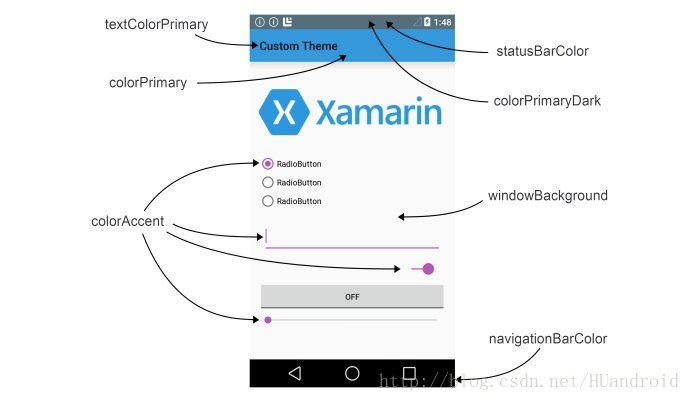
- colorPrimary 应用的主要色调,actionBar默认使用该颜色,Toolbar导航栏的底色
- colorPrimaryDark 应用的主要暗色调,statusBarColor默认使用该颜色
- statusBarColor 状态栏颜色,默认使用colorPrimaryDark
- windowBackground 窗口背景颜色
- navigationBarColor 底部栏颜色
- colorForeground 应用的前景色,ListView的分割线,switch滑动区默认使用该颜色
- colorBackground 应用的背景色,popMenu的背景默认使用该颜色
- colorAccent CheckBox,RadioButton,SwitchCompat等一般控件的选中效果默认采用该颜色
- colorControlNormal CheckBox,RadioButton,SwitchCompat等默认状态的颜色。
- colorControlHighlight 控件按压时的色调
- colorControlActivated 控件选中时的颜色,默认使用colorAccent
- colorButtonNormal 默认按钮的背景颜色
- editTextColor:默认EditView输入框字体的颜色。
- textColor Button,textView的文字颜色
- textColorPrimaryDisableOnly RadioButton checkbox等控件的文字
- textColorPrimary 应用的主要文字颜色,actionBar的标题文字默认使用该颜色
- colorSwitchThumbNormal: switch thumbs 默认状态的颜色. (switch off)
- fitsSystemWindows 生效前提:当前页面没有标题栏,并且状态栏或者底部导航栏透明
- fitsSystemWindows = true,表示内容区不延伸到状态栏或底部导航栏
- fitsSystemWindows = false,表示内容区延伸到状态栏或底部导航栏