回滚 (回滚是远程仓库操作,撤销是本地操作)
已进行git push,即已推送到远程仓库中。我们将已被提交到“远程仓库”的代码还原操作叫做回滚!
注意:对远程仓库做回滚操作是有风险的,需提前做好备份和通知其他团队成员!
1. 撤销指定文件到指定版本
# 查看指定文件的历史版本
git log <filename>
# 回滚到指定commitID
git checkout <commitID> <filename>
2. 删除最后一次远程提交
-
使用revert
git revert HEAD git push origin master -
使用reset
git reset --hard HEAD^
git push origin master -f
二者区别:
revert是放弃指定提交的修改,但是会生成一次新的提交,需要填写提交注释,以前的历史记录都在;reset是指将HEAD指针指到指定提交,历史记录中不会出现放弃的提交记录。
回滚某次提交
# 找到要回滚的commitID
git log
git revert commitID
删除某次提交
git log --oneline -n5
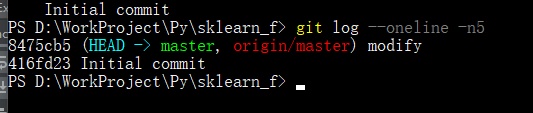
git rebase -i "commit id"^
注意:需要注意最后的^号,意思是commit id的前一次提交
git rebase -i "8475cb5"^